
BETA
SPOTIFY MUSIC BINGO SOFTWARE
YOUR SPOTIFY PLAYLIST IS THE
WHOLE SHOW.
Phenom Bingo Lite turns a Spotify playlist into a full music bingo night. Build the playlist and cards in the Music Bingo Card Generator. Lite plays each song from its hook, fires your stings, runs the big screen and puts auto-marking cards on your players' phones, styled your way. When someone calls bingo, you check it in one click. It's in active beta, and we're inviting a small group of working hosts to shape it.

ⓘ
THIS IS A BETA — NOT FOR GENERAL RELEASE
Phenom Bingo Lite is feature-complete and runs real games, but it's still in testing. We're not selling it yet. We're looking for a small group of Founding Hosts to run live nights, find the rough edges, and help us get it right before launch. In return, Founding Hosts get 12 months of Phenom Bingo Lite free.
FULL WALKTHROUGH
SEE PHENOM BINGO LITE RUN A FULL SPOTIFY MUSIC BINGO SHOW
Watch it turn the Spotify playlist you already use into a big-screen show: song titles on screen, phone players, paper and digital in one game, and winner checks in a click. No calling out songs. No Shazam.
What you'll be testing
ONE APP RUNS THE WHOLE NIGHT.
You bring a Spotify Premium account and your playlists, built in the Music Bingo Card Generator. Lite runs the night.
SPOTIFY-POWERED HOSTING
PRESS PLAY. IT RUNS THE ROOM.
Lite controls playback on any Spotify Connect device: your PA, a Sonos, a Bluetooth speaker. Every song starts on the hook you set in the Card Generator, your stings fire between tracks, and you move the night on with Next or Fade to Next when the room's ready.
If Spotify signs you out mid-game, a Reconnect box opens on the screen you're on and retries the button you pressed. Most nights you'll never see it, because Lite refreshes the sign-in quietly first. It also switches off Spotify's repeat and shuffle for the game, so a song ends when it should.

THE DIGITAL GAME
PLAYERS JOIN WITH A QR CODE (OR ENTER THE GAME CODE)
Scan the code on the big screen, type a name, and a card appears on the phone. No app, no account, any browser. No big screen? Not a problem! Players can access their cards by going to phenombingo.live and entering the game code.
Phones join through our game relay at phenombingo.live, over mobile data or any Wi-Fi, so nobody needs the venue's network and nothing extra runs on your laptop.
You can allow cards to mark themselves as songs play, after a delay you set (or players tap them, your call). A phone that sleeps or drops out reconnects with every mark intact. When someone taps Call Bingo, a notice appears on whatever page you're on, with their name and card number, and stays until you check it.
Busy door? Tick Accept join requests automatically and players come straight in until the first song plays.

THE DIGITAL GAME
PLAYERS JOIN WITH A QR CODE (OR ENTER THE GAME CODE)
Scan the code on the big screen, type a name, and a card appears on the phone. No app, no account, any browser. No big screen? Not a problem! Players can access their cards by going to phenombingo.live and entering the game code.
Phones join through our game relay at phenombingo.live, over mobile data or any Wi-Fi, so nobody needs the venue's network and nothing extra runs on your laptop.
You can allow cards to mark themselves as songs play, after a delay you set (or players tap them, your call). A phone that sleeps or drops out reconnects with every mark intact. When someone taps Call Bingo, a notice appears on whatever page you're on, with their name and card number, and stays until you check it.
Busy door? Tick Accept join requests automatically and players come straight in until the first song plays.
THE BROADCAST SCREEN
A SHOW THE WHOLE ROOM WATCHES
The broadcast opens on your venue TV by itself. Show album art or your own branded image. The title holds back for as many seconds as you choose, so the room names the song by ear first. An animated overlay sweeps the winning pattern and a ticker scrolls the played songs.
When a call is checked, the card on screen is the card in the room: drawn exactly as it prints, in your card theme and in any language, with played squares and the winning line matching your theme. During a phone game it matches the cards on their phones. Then your winner video rolls.

NEW IN THE BETA
THE CARDS ON THEIR PHONES, IN YOUR COLORS
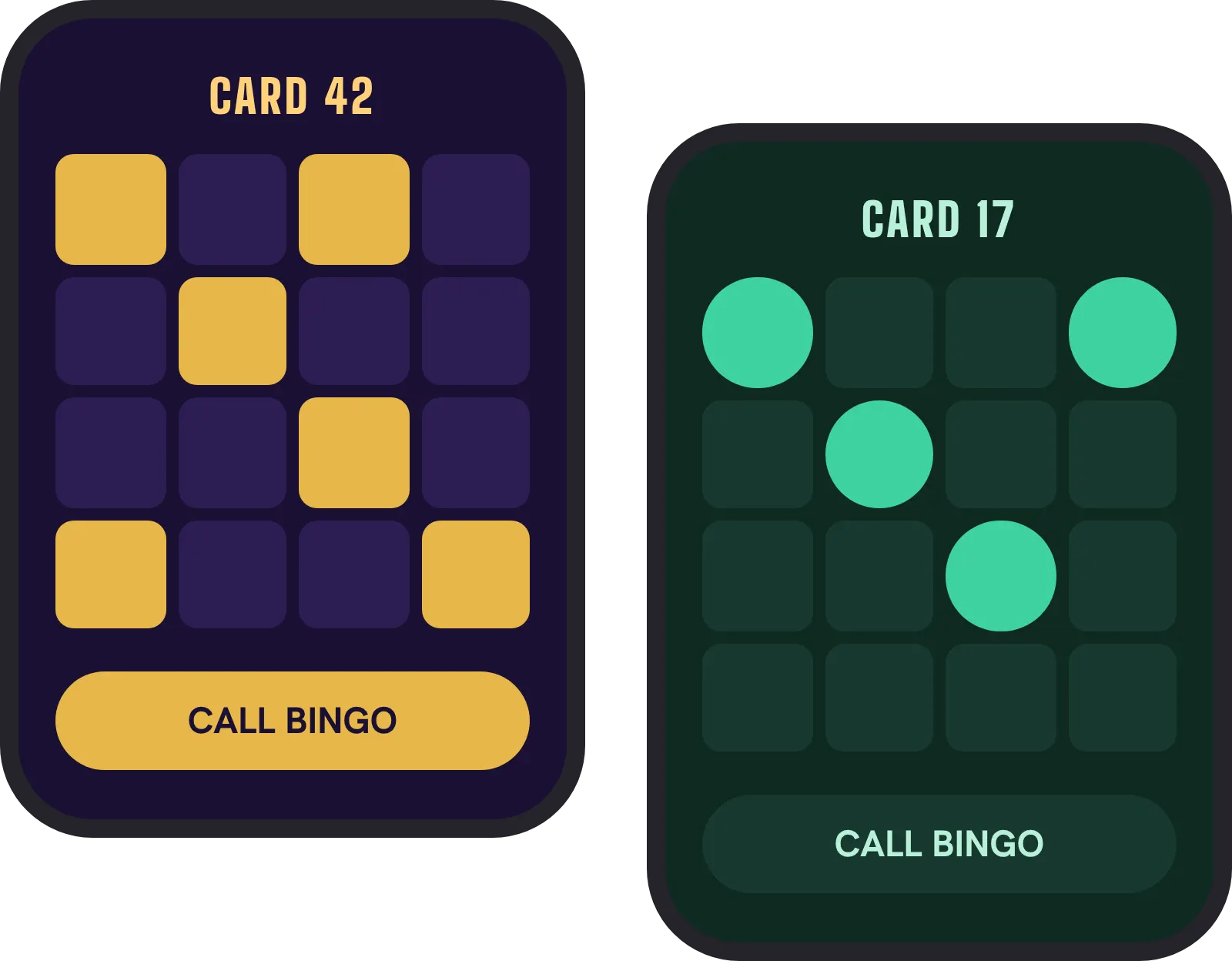
Give the cards on players' phones your own look: the page colour and background picture, the card panel, fonts, how a marked square looks, the winning line and the "one to go" frame. Bring a paper card theme across from the Card Generator so the phones match the printed cards. A live phone preview shows it on your own playlists before anyone joins.
The look carries all the way through. The join screen, Bingo Alert, Game Over and every message on the phone pick up the same colours, with nothing extra to set. And when you check a call, the card on the big screen wears the same theme as the phones.
You choose one theme for the phones in each game; players don't pick their own. A phone shows a font only if it has it, and the preview tells you when one might be missing.
NEW IN THE BETA
THE CARDS ON THEIR PHONES, IN YOUR COLORS
Give the cards on players' phones your own look: the page colour and background picture, the card panel, fonts, how a marked square looks, the winning line and the "one to go" frame. Bring a paper card theme across from the Card Generator so the phones match the printed cards. A live phone preview shows it on your own playlists before anyone joins.
The look carries all the way through. The join screen, Bingo Alert, Game Over and every message on the phone pick up the same colours, with nothing extra to set. And when you check a call, the card on the big screen wears the same theme as the phones.
You choose one theme for the phones in each game; players don't pick their own. A phone shows a font only if it has it, and the preview tells you when one might be missing.
Card Theme Library
Free themes for players' phones.
Download any theme from the Phenom Card Theme Library for free and import it into Lite. Players' phones take on the look. Use it as it comes, or change the colours, fonts and marked squares to suit your room.
- 1Download a theme
Pick any theme from the library. Every one is free.
- 2Import it
Open Digital Card Themes and click Import. It's added as a new theme.
- 3Use it or make it yours
Click Use on phones to send it to players, or adjust it first and click Save.
Match your paper cards. Print the same theme in the Music Bingo Card Generator, and paper and phone players see the same look.
Browse the Card Theme LibraryTOTAL HOST CONTROL
RUN IT FROM YOUR POCKET
A PIN-protected phone remote handles play, skip-with-sting and fade-to-next from anywhere in the venue, with hotkeys on the desk. Draw your own winning patterns for 4×4 and 5×5 cards, and change the pattern mid-game; every phone updates instantly.
If the app ever closes mid-game, reopen it and the game picks up where it was: queue, played songs, pattern and the same speaker.

BUILT FOR A BETA
STUCK? ASK THE APP.
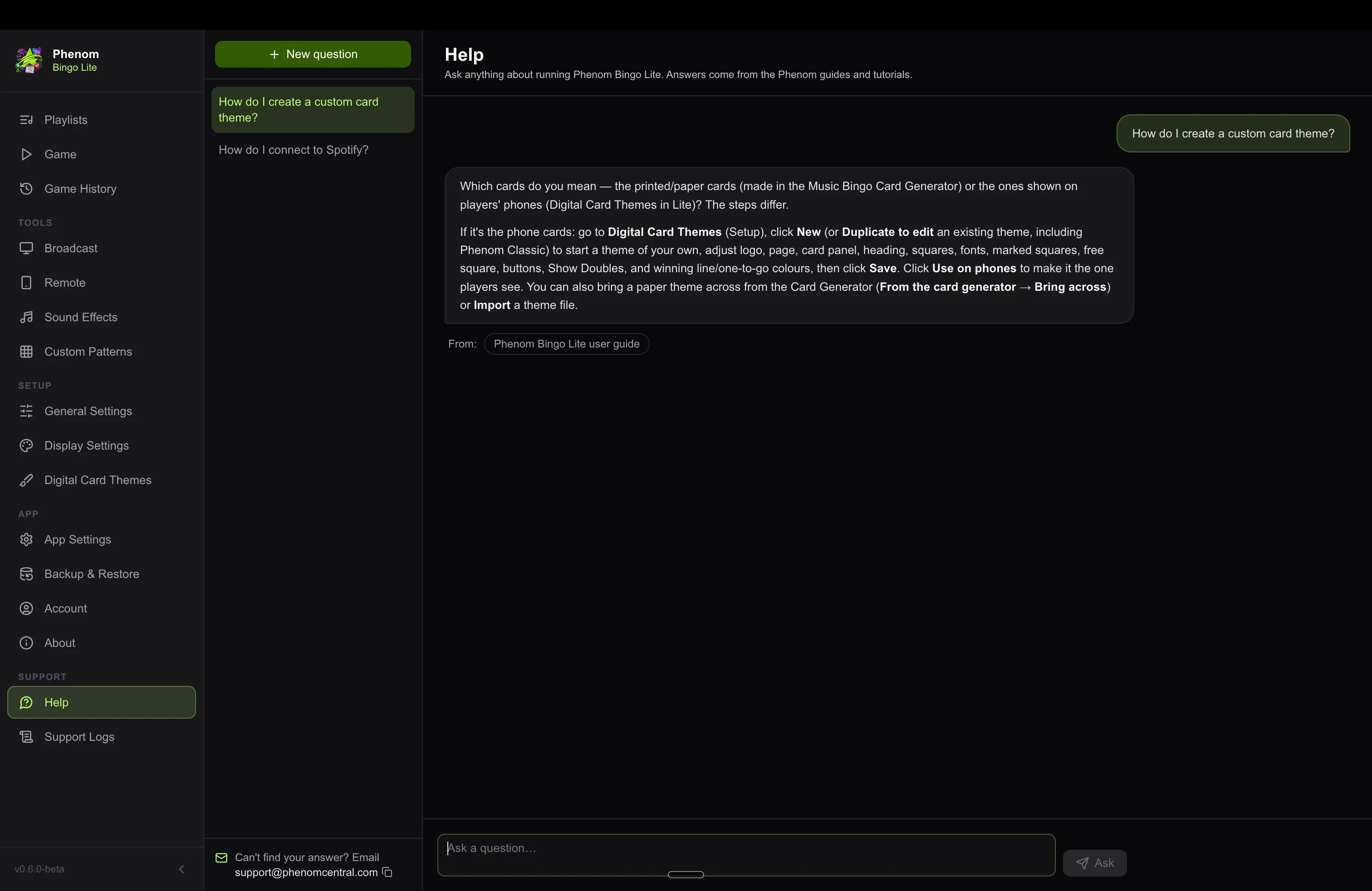
Help is a page inside Lite. Type a question the way you'd ask a person and get an answer from the Lite guides, with the tutorial video when there is one. When the guides don't cover it, Help says so and we hear about it, which is how the guides grow during the beta.
Updates download and install inside the app, on Mac and Windows, when you choose. Lite never restarts during a game, so a fix we ship on Friday afternoon can't interrupt your Friday night.
BUILT FOR A BETA
STUCK? ASK THE APP.
Help is a page inside Lite. Type a question the way you'd ask a person and get an answer from the Lite guides, with the tutorial video when there is one. When the guides don't cover it, Help says so and we hear about it, which is how the guides grow during the beta.
Updates download and install inside the app, on Mac and Windows, when you choose. Lite never restarts during a game, so a fix we ship on Friday afternoon can't interrupt your Friday night.
Every feature, unlocked for testers
NOTHING HELD BACK DURING THE BETA.
-
Auto-marking phone cards, unique per player (Option, host controlled)
-
Branded broadcast screen with tease reveal
-
Paper and digital players in the same game
-
Crash-proof mid-game resume
-
Phones join over mobile data or any Wi-Fi
-
Reconnect to Spotify without leaving the game
-
Help and updates built into the app
What you'll need: macOS or Windows · a Spotify Premium account · the Music Bingo Card Generator (a separate one-time A$39 purchase, required — it imports your Spotify playlist, builds the cards, and lets you edit titles and set start times that Lite plays) · an internet connection for the phone game. A second screen (TV/projector) is recommended for the broadcast.
HOW A NIGHT RUNS
FROM PLAYLIST TO PACKED ROOM, IN FIVE STEPS
-
1Build your playlist
Import a Spotify playlist into the Music Bingo Card Generator, edit titles, set start times, generate your cards, then print or go all-digital.
-
2Pick & play
Open Lite, choose the playlist, the pattern and your card themes, and hit Start. The broadcast opens on your TV by itself.
-
3Players join
They scan the QR on the big screen, type a name, and you approve them. Cards appear in seconds.
-
4Host the room, not the laptop
Songs play from the hook, stings fire, phones mark themselves (you control it), and the screen teases each song. You work the floor.
-
5"BINGO!"
One click to check it. The card hits the big screen, the winning line glows gold, and the winner video rolls.
BECOME A FOUNDING HOST
HELP SHAPE IT. GET REWARDED FOT IT.
We're taking on a small, hand-picked group of hosts to run real nights on Phenom Bingo Lite and tell us the truth about it. If that's you, here's the deal.
✓
You host real games. Pubs, clubs, DJs, fundraisers — anyone running music bingo nights for an actual audience, not just testing at home.
✓
You have a Spotify Premium account, and you'll use the Music Bingo Card Generator (a one-time A$39 app) to build your playlists and cards (it's required — it's where the games are made).
✓
You'll give honest feedback. What broke, what confused you, what you wished it did — the good and the brutal.
✓
You're on Mac or Windows and happy to update the app as we ship fixes through the beta.
WHAT WE ASK
Run a handful of real games during the beta and send us your honest notes: bugs, confusion, wishes. Twenty minutes of feedback after a night is plenty.
WHAT YOU GET
12 months of Phenom Bingo Lite free, a real say in where it goes, and Founding Host recognition when we launch.
Beta questions
GOOD QUESTIONS.
● ● ● ● ●
PRESS PLAY. HOST THE PARTY.
Be one of the first hosts to run Spotify-powered music bingo with Phenom Bingo Lite — and help shape it before anyone else.